Why Most PM Prompts Fail and What to Write Instead
Most project managers treat prompts like they treat Google searches—type a few words, hope for something useful, move…

Most project managers treat prompts like they treat Google searches: type a few words, hope for something useful, move on. The problem is that AI isn't a search engine. It's a tool that responds proportionally to how much structure and context you give it. Vague prompts produce vague outputs. Specific prompts produce outputs specific enough to actually use in your project.
Here's the real cost: You spend 20 minutes asking ChatGPT to "help me write a status report" and get back something generic enough to fit any project. You could have spent 5 minutes writing a structured prompt, gotten output you can use in 10 minutes, and saved yourself 15 minutes of editing and context-switching. But more importantly, the difference between a mediocre AI output and a usable one is not smarter AI. It's smarter input from you.
The gap is not that AI cannot help. The gap is that most PMs don't know how to ask for what they actually need.
Why your prompts are probably failing
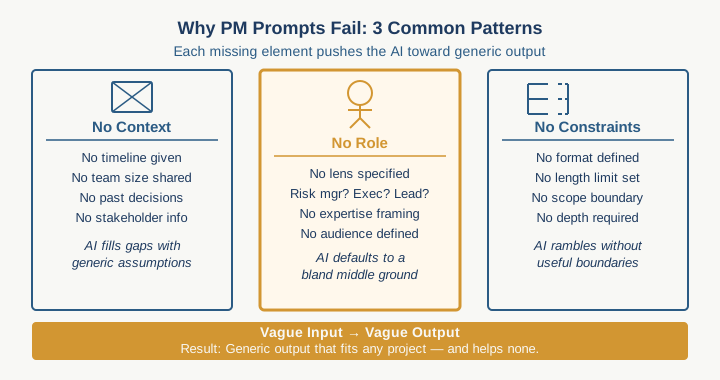
When a prompt fails, it usually fails in one of three ways. First, you give the AI no context about your specific situation: your timeline, team size, stakeholder dynamics, what has already been decided. The AI fills that vacuum with generic platitudes. Second, you don't tell the AI what role to play or what lens to use. Should it think like a risk manager? An executive? A team lead? Without that signal, it defaults to a middle-of-the-road voice that fits no one. Third, you don't specify what "done" looks like. Is the output a bulleted list? A narrative? A framework to fill in? Should it be 200 words or 1,000? The AI guesses.
None of these failures are AI's fault. They are prompt-craft failures.
The structure that changes everything
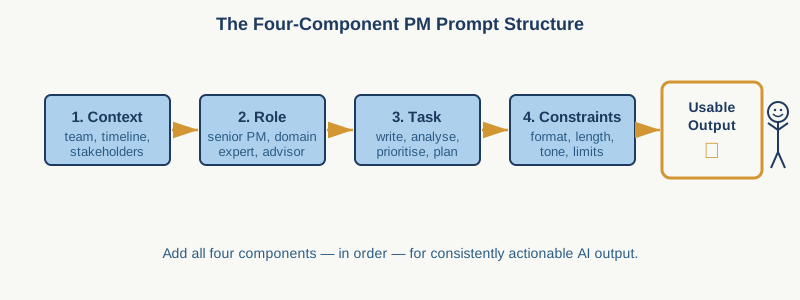
A high-performing prompt has four essential components. Context comes first: the specific details about your project that make the output relevant instead of generic. Role comes second: the perspective or expertise you want the AI to adopt. Task comes third: what you are actually asking it to do. Constraints come fourth: the limits, format, or guardrails that shape the output.
Let me show you what this looks like in practice. Instead of asking "write me a risk register," you would write: "I am managing a six-month migration project for 40 stakeholders across three departments. Our biggest risk is stakeholder misalignment on scope. Write a 15-item risk register that prioritizes political and execution risks for steering committee review. Format it as three columns: risk, probability, mitigation. Keep each mitigation to one sentence."
The difference is night and day. The first prompt produces a template. The second produces a document you can modify and use on Monday.
Where most PMs stop too early
The moment your prompt stops being too vague, it starts being useful. But there is another level: feeding the AI your actual project parameters and letting it reason through them. This is where your context advantage compounds.
If you are writing a prompt about scope definition, include your team size, your timeline, your budget boundaries, and your stakeholder approval process. If you are asking for a communication plan, include who your key stakeholders are and what has made them difficult to align in the past. If you are working on a change control process, tell the AI how many changes you typically field per month and how much overhead you can absorb.
The more specific your context, the more the AI can tailor its output to your actual delivery situation instead of a generic project scenario. It is the difference between advice for "managing project risk" and advice for "managing project risk when you have two weeks to recover from a scope breach."
The role that elevates the output
One sentence can double the usefulness of an AI response: "Answer this as an experienced delivery manager reporting to a C-suite steering committee." Or: "Think like a risk analyst. What am I not seeing?" Or: "You are the most skeptical stakeholder in the room. What would make you object to this plan?"
When you assign the AI a role, you are telling it what tone to use, what level of detail to provide, and what kind of thinking to apply. A CFO-perspective prompt on project health will surface cost and timeline risks. A team-lead perspective will surface execution and morale risks. Same project, radically different outputs.
Try this: Take a task you are stuck on, maybe a difficult stakeholder message or a risk communication, and write two prompts. In the first, ask for help normally. In the second, tell the AI to answer as the person you most need to convince (your sponsor, a skeptical stakeholder, a budget-conscious executive). Read both responses. You will see the difference immediately.
Three templates you can use this week
For scope definition: "I am defining scope for a [project type] running from [date] to [date] with a team of [size] and [number] stakeholders. Key constraints: [constraint one], [constraint two]. Our steering committee needs a one-page scope summary in three sections: what is in, what is out, and why. Write this for a [role] audience."
For risk analysis: "I have a [project duration] project with these known risks: [list them]. We are most exposed to [type of risk] based on past project history. As a risk analyst, what am I missing? Identify five risks I haven't named and suggest one early indicator for each."
For stakeholder communication: "I need to communicate to [stakeholder group] that [situation]. They care most about [priority one], [priority two], and [priority three]. The tone should be [candid/reassuring/transparent]. Write a 150-word message I can send on Monday."
Each of these templates does one thing: it gives the AI enough specificity to produce output you can actually use.
The honest limitation
AI cannot read between the lines of your project politics or see the patterns in your team dynamics that only you see. If you leave out crucial context, such as a sponsor who is secretly unhappy, a dependency you forgot to mention, a past project failure that shapes current expectations, the prompt will miss it. The quality of the output will still depend on the quality of what you put in.
Your job is not to ask the AI harder questions. Your job is to give it better information.
Start here
Pick one recurring task this week where you usually produce something that feels generic or takes longer than it should. Write that task as a structured prompt using the template above. Run it against your current way of working. Count the minutes you save and the quality bump you get. That gap is your signal that prompt craft is worth learning.
Practical AI intelligence for project managers. Weekly, free. Get frameworks, tools, and decisions that help you stay ahead of AI adoption on your projects. No hype. No filler. Subscribe free →
Stop writing from scratch. Get the 20 prompts PMs actually use for status reports, stakeholder updates, and retro summaries. Download free →