Why AI Gets PM Work Wrong When Context Gets Lost
You hand off work to AI three times a day, and most of it gets sent back incomplete.
You hand off work to AI three times a day, and most of it gets sent back incomplete.
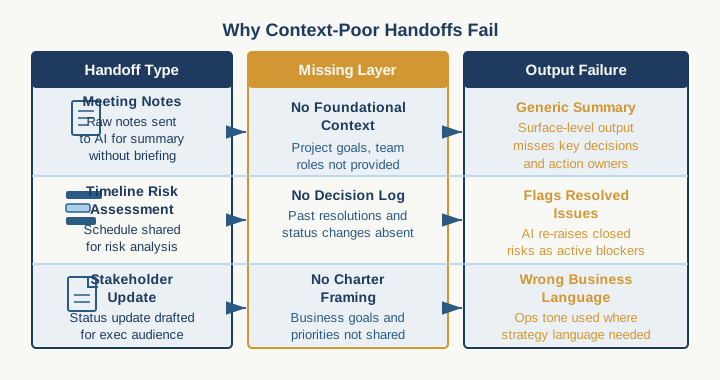
The meeting notes go into ChatGPT with no project context, so it generates a summary that misses what actually matters. You paste a timeline into Claude to get a risk assessment, but it flags problems you already mitigated two sprints ago because the handoff didn't include your decision log. You ask an AI tool to draft a stakeholder update and it talks about deliverables in the wrong business language because it never saw the steering committee charter that defines how this project gets framed.
This is not a problem with the AI. This is a context collapse problem, and it's the root cause of why AI output in project management feels half-useful instead of transformative.
Here is what is actually happening: Project management lives in context, not data. The project scope document matters less than the unspoken understanding of what the sponsor really needs. The schedule matters less than the three stakeholder priorities that sometimes conflict with the schedule, and the implicit decision about which one wins. The status report matters less than the pattern of which risks are actually escalating versus which ones you are actively managing down. None of that lives in a single tool. It lives in a PM's head, distributed across Jira tickets and Confluence pages and Slack threads and conversations that happened in the hallway.
When you hand off work to AI without that context, the tool makes reasonable guesses based on the surface-level information it receives. Those guesses are rarely what you needed. So you rewrite the output, or you give up on the tool, or you use it for small things only. Either way, you have added a step instead of removing one.
The fix is structural. You need to build a handoff framework that moves context deliberately from your head into a form that AI can actually use.
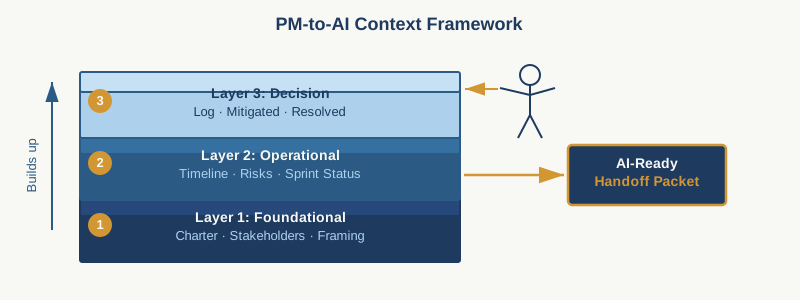
Start by identifying the three layers of context that matter for your handoffs.
Foundational context is the stuff that barely changes: the project charter, the stakeholder landscape, the budget constraints, the technical or business assumptions that frame all decisions on this project. This lives somewhere stable: a Confluence page, a Notion database, a shared document. When you hand off work to AI, you point it to this context once and refer back to it by name. "Refer to the project charter in the team wiki" is faster than re-explaining the sponsor's priorities every time.
Operational context is what is happening right now: the current milestone, which dependencies are blocked, the three things you are watching this week, the resources that are stretched thin. This changes weekly or more. The best place for this is your status artifact, whether that is a Jira board, a weekly update document, or a PMO dashboard. The structure matters more than the tool. When you hand off to AI, you point it to the current state of that artifact and say "this is the operating environment I need decisions within."
Decision context is the hardest layer and the one most PMs skip. It is the reasoning behind the choices that are already made. Why did you de-prioritize that feature? Why are you accepting that schedule risk? Why did the steering committee reject that resourcing option? These decisions are usually implicit in a PM's head. They live in action item notes from meetings, or in Slack threads, or they are not written down at all. When you hand them off to AI without this layer, the tool will suggest solutions that contradict decisions you have already made, and you will dismiss the output as unhelpful.
Write a one-page decision summary for each major decision made in the last 30 days. One sentence: the decision. Two sentences: why it matters and what was rejected. That is it. When you ask AI to help with anything downstream of that decision, reference it. "Given that we are accepting timeline risk to hit the budget constraint [decision summary link], here is what I need..."
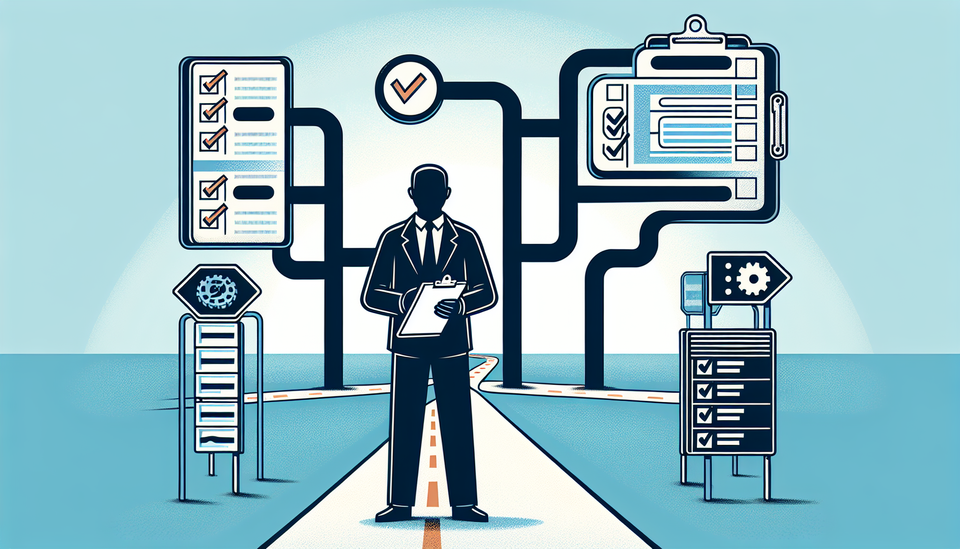
Now build handoff templates for the three to five scenarios you repeat most often.
For a status report handoff: paste the current RAG status, the three blockers you are managing, the one thing that changed since last week, and the one decision the steering committee needs to make. Nothing more. AI can then translate this into whatever stakeholder communication style your exec prefers without guessing at what matters.
For a risk assessment handoff: list the project constraints in priority order, summarize the current plan, and paste the decision context from any recent choices that accept risk. Ask AI to identify what is now at odds with those constraints or decisions. It will catch things faster than you will spot them by eye.
For a resource request handoff: state the skill gap, the timeline constraint, and the cost boundary. Then paste the most recent prioritization decision that affects where this role sits in the queue. Ask AI to draft the business case within those constraints. It will not second-guess your priorities.
Test these templates on one low-stakes handoff this week. Send the same work to AI twice: once without the three context layers, once with them. The difference in output quality will tell you whether this framework is worth scaling.
What you will probably find is that the handoff with full context requires more setup time but produces output you can use, while the quick handoff produces something you have to substantially rewrite or abandon. Over a month of repeated handoffs, the one with structure saves you time.
The real shift is this: effective AI work in project management is not about asking better questions. It is about providing enough structure that the AI understands the constraints you are already operating within. That structure already exists in your head and your best practices. You are just making it visible.
Pick one handoff scenario that repeats at least twice a week on your current project. Document the foundational context, the current operational state, and the relevant decision context it should be aware of. Build one template. Run it for four weeks. Count how many outputs you can use without substantial revision. That number will tell you whether you have found a real efficiency or a tool that looks useful until you measure the actual time saved.
Practical AI intelligence for project managers. Weekly, free. Get frameworks, tools, and decisions that help you stay ahead of AI adoption on your projects. No hype. No filler. Subscribe free →
Stop writing from scratch. Get the 20 prompts PMs actually use for status reports, stakeholder updates, and retro summaries. Download free →