Why Generic AI Tools Underdeliver for Project Managers
The AI tools your team uses stopped being separate little assistants you bolt onto your existing workflow. Instead, the tools you already open every day (Jira, Asana, Notion, Teams) started getting smarter about you specifically. And that distinction matters more than you might think.

You've probably noticed something shift in the last year. The AI tools your team uses stopped being separate little assistants you bolt onto your existing workflow. Instead, the tools you already open every day (Jira, Asana, Notion, Teams) started getting smarter about you specifically. And that distinction matters more than you might think.
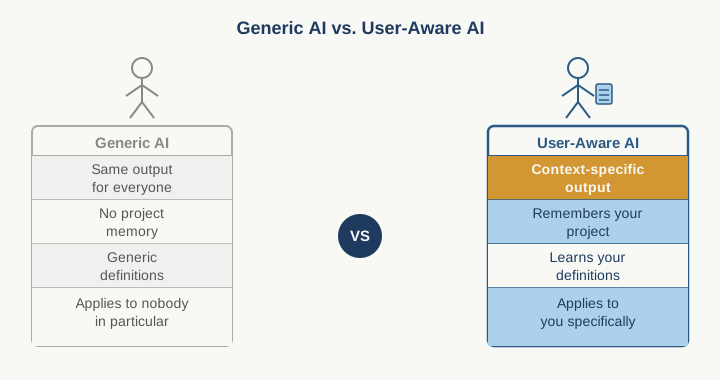
Here's what changed: generic AI tools treat all project managers the same way. ChatGPT doesn't know your project charter. Copilot doesn't know your team's definition of "blocked" versus "at risk." A standard AI assistant gives you generic advice that applies to everyone and therefore helps nobody in particular. It suggests things that sound reasonable in a vacuum but clash with how you actually work. So you ignore it, or you spend energy translating the output to fit your reality. That friction is real, and it costs time every single day.
Purpose-built AI, the kind embedded in tools that already know your project structure, your team composition, your historical timelines, and your company's delivery patterns, works differently. It learns. Not in the sci-fi sense, but in the practical sense: it sees your RAID log, it understands which escalation paths you use, it notices which risks actually materialize versus which ones get managed quietly. When that AI makes a suggestion, it is rooted in your actual constraints, not someone else's playbook.
For you as a PM, this difference shows up in three concrete ways.
First, the speed of decision-making improves because the AI is talking about your project, not a hypothetical one. When you use generic AI to write a status report, you start from scratch. You describe the context. You explain the blockers. You translate jargon because the tool does not speak your language. With user-aware AI, you tell it "flag the risks that affect the steering committee meeting next week" and it pulls the right items from your RAID log, because it has learned what "steering committee risk" means in your environment. That is not a small convenience. That is an hour you get back per report, times twelve reports a year, times the difference between status reporting that lands and status reporting that requires three follow-up emails to clarify.
Second, you catch delivery problems earlier because the AI is looking at patterns specific to your team. Generic AI has no baseline. It cannot tell you that when a task sits "in progress" for eight days without a comment, that usually means someone is stuck but too polite to escalate. Your enterprise AI can. It has seen your team's patterns. It knows the difference between "this is normal context-switching" and "this looks like a blocker." It surfaces those patterns at the moment you can still act on them, not three days into a crisis.
Third, you spend less energy fighting the tool and more time thinking like a PM. This is the one nobody mentions but every PM feels. When a tool forces you to translate your thinking into its language, you lose momentum. When a tool speaks your language, when it understands milestones the way you do, when it knows your escalation thresholds, when it can summarize a Confluence document in the tone your CFO expects, you move faster. The cognitive load drops. And cognitive load is the silent killer of good project management.
So why are enterprises making this shift now instead of three years ago? Cost, partly. But mostly because the tools themselves got smart enough to integrate without breaking. A year ago, embedding AI meant choosing between your core tool and a specialized AI layer. Now, the core tools are the specialized layer. Jira learned how to prioritize. Monday.com learned how to predict timeline risk. Notion learned how to surface what matters from your meeting notes.
There is an adoption tax here, and it is worth naming. Moving from generic AI (which you can treat as disposable and low-stakes) to embedded, learning AI means you have to trust the tool with more context. You have to be more intentional about how you use it. You cannot just prompt it casually and ignore the output. If the tool is learning from your behavior, then your behavior teaches it. That means you need to actually run the experiment and pay attention to what it surfaces, not treat it as background noise.
Here is what I would do this week: Pick one recurring PM pain point that eats 30 minutes of your time. Status report writing. Risk prioritization. Dependency mapping. Something specific. Then check whether your primary tool, the one you open most often, has an AI feature built in that addresses that pain point. If it does, use it for the next four cycles instead of your usual method. Do not combine them. Do not hedge. Actually let the tool learn your preferences.
Then count what changes. Not just time saved, but decision quality. Did you catch something you usually miss? Did the output need less revision? Did your stakeholders need fewer clarifications?
That gap between "the tool saves me time" and "the tool makes me think differently" is where this really pays off.
Practical AI intelligence for project managers. Weekly, free. Get frameworks, tools, and decisions that help you stay ahead of AI adoption on your projects. No hype. No filler. Subscribe free →
Not sure which AI tools to trust on your projects? Download the free AI Tool Evaluation Checklist: 12 questions PMs ask before approving any AI tool for their team. Download free →