How to Tell If Your AI Tools Are Actually Improving
You implemented an AI tool three months ago. Your team is using it. The tool is working. And you have no idea whether it actually matters. This is the moment most PMs get stuck.

You implemented an AI tool three months ago. Your team is using it. The tool is working. And you have no idea whether it actually matters.
This is the moment most PMs get stuck. You can see activity. You have adoption. But you cannot answer the question your leadership asks: Is this saving us time or just moving work around? That question matters because without a clear answer, you cannot justify the next tool, defend the investment to finance, or know whether to expand the workflow to other teams.
The real problem is not measuring AI impact. It is that most PMs implement AI tools without defining what success looks like before rollout. No baseline. No target metrics. No agreement upfront on what would prove the tool is worth keeping. So when adoption settles, you are left guessing.
Here is what actually changes when you measure AI impact correctly: you go from hoping tools help to knowing which workflows genuinely move the needle and which ones just feel productive because they use new software.
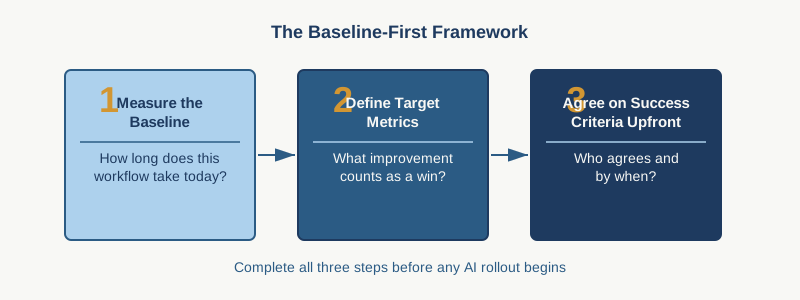
Start with your baseline. Before any AI tool touches your delivery process, capture three things: the current time investment, the current error rate or rework cycle, and the current team sentiment about the workflow you are about to automate. Write these down. Make them specific. Not "status reporting takes too long." Instead: "Weekly status report takes each team lead 45 minutes. Steering committee still asks clarifying questions in 60% of meetings."
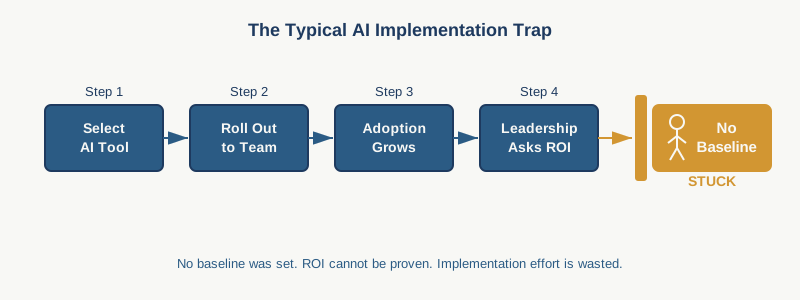
This takes one hour. It feels bureaucratic. It is the most important hour you will spend on AI adoption because it is your comparison point. Without it, you cannot measure anything real.
Now run the tool for two weeks. Then check three things again: actual time per workflow, error or rework rate, team feedback on friction or perceived value. The gap between week one and week three is your signal. Not the tool vendor's demo. Your actual data.
Most PMs stop here. They measure time saved. That is incomplete. Time saved is one metric. It is not the full picture of whether the tool is actually improving delivery.
Track cycle time. If you implement an AI tool to accelerate status reporting but cycle time on decision-making does not move, the tool is creating a faster status report you do not need. Track error rates or rework. An AI tool that saves 30 minutes on documentation but introduces quality issues that cost three hours to fix is a net loss. Track stakeholder satisfaction. Some AI tools create faster outputs that nobody trusts or reads. That is a tool failure disguised as automation.
What you really want to measure is decision velocity. Can your leadership team move faster because they have better information, faster? Can your team move faster because they spend less time on status and more on delivery? Those are the metrics that connect to actual project health.
Watch for hidden costs. This is where most AI ROI calculations break. The tool saves 30 minutes of writing, but someone still has to review the AI output for accuracy. Someone has to catch hallucinations. Someone has to fix the formatting the AI broke. Suddenly that 30-minute saving costs 20 minutes of review work. Add tool management overhead. Someone has to maintain the prompts, troubleshoot when quality drops, update tool access as the team changes. These costs are real and they are often invisible until you look.
Run a monthly pulse check with your team. Ask three questions: What AI workflow is actually saving you time? What workflow feels like busy work? What workflow creates quality risk? Do this in a quick Slack survey or a five-minute standup conversation. The answers tell you far more than any spreadsheet. Your team lives with these tools every day. They know which ones work and which ones are waste.
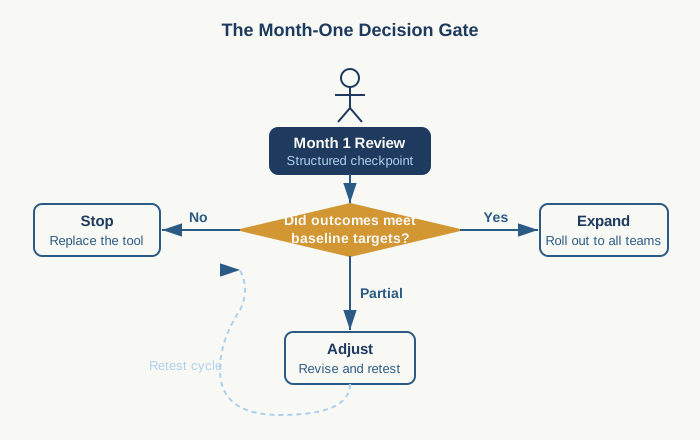
Set a decision point. After four weeks of real usage and measurement, decide: keep this tool, modify how we are using it, or remove it. Not "give it another month to work." Decide. If the metrics show cycle time did not move and rework increased, remove it or change the workflow fundamentally. That is not failure. That is learning at scale.
Here is the practical workflow: grab your existing project dashboard or a simple spreadsheet. Create four columns: metric name, baseline, week 2 actual, week 4 actual. Include one time metric, one quality metric, one decision-velocity metric, and one team-satisfaction metric. Update it every two weeks for the first month. Share it with your team. Use it to decide whether the tool stays.
The frame that works with leadership: we are treating this like a project. We set success criteria upfront. We measure actual impact. We have a decision gate at month one. This shows you take AI adoption seriously and you care about outcomes, not just tools.
What is the one workflow you have wanted to automate but been nervous about because you could not measure success? Start there. Establish your baseline this week. Then you will have permission to move forward with confidence.
Practical AI intelligence for project managers. Weekly, free. Get frameworks, tools, and decisions that help you stay ahead of AI adoption on your projects. No hype. No filler. Subscribe free →
Stop writing from scratch. Get the 20 prompts PMs actually use for status reports, stakeholder updates, and retro summaries. Download free →