AI Risk Gap That Quietly Erodes Your Credibility as a PM
AI adoption succeeds when tools remove work instead of adding friction. Project managers should prioritize meeting transcription, native AI within project platforms, and rapid research tools. Each improves speed and visibility, but still requires human judgment, disciplined data, and verification.

You've picked three AI tools and rolled them out to your team. Two of them are sitting unused. The third one, your PM is using, but nobody else knows how, and when they ask for help, the answer is always "I'll show you later." This is not adoption. This is a tool in a drawer.
The real problem is not that AI tools exist. It is that most PMs treat them like optional productivity sprinkles rather than core workflow changes. You add them on top of what you already do instead of asking what you actually stop doing when the tool works. That friction, that "now we have one more thing to learn" feeling, is what kills adoption before it starts.
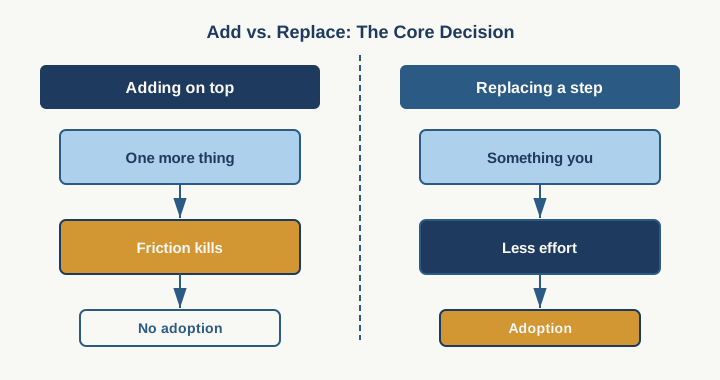
Here is what changes when you pick the right three tools and integrate them properly: your team stops duplicating work, your status reports become faster to write and harder to argue with, and you catch scheduling conflicts before they become fire drills. But you only get there if the tool actually removes a step, not adds one.
The first tool every PM should be using is a meeting transcription and summary tool. Otter.ai, Fireflies, Fathom, or your online meeting native platform's version such as Zoom AI companion or MS Teams Copilot are the specific move here. Here is why this is a low hanging fruit: every status meeting, steering committee, and stakeholder sync produces information that lives in someone's notebook or the chat history nobody will ever scroll back through. A PM spends time after the meeting reconstructing what was decided, who committed to what, and what risk someone mentioned in passing. The transcription tool does the reconstruction for you.
The honest limitation: it does not read minds. If someone said "we might have a resource problem," the tool will flag it as a potential risk, but it will not know whether that person meant it is already a problem or just theoretical. You still have to read the summary and convert signals into actions. What the tool removes is the work of figuring out what was actually said.
The workflow is simple. Hit record at the start of your meeting. Let it run. The tool transcribes, summarizes, and gives you a timestamp-linked recap. You read it in five minutes instead of spending 20 minutes trying to reconstruct the hour. You send the summary to your team before they forget half of what they committed to. Done.
The second tool is your project management platform's native AI assistant. Jira's Atlassian Intelligence, Asana AI, or Azure DevOps AI Work Item Assistant. Not a third-party bolted on top, but the AI already built into the tool your team is already using daily. This matters because adoption friction drops to near zero. Your team is already opening Jira. Now when they open it, AI is there.
The real value is status report generation and dependency surfacing. You tell the AI to generate a project health report from the last two weeks of activity. It pulls sprints, tickets, test results, and comments into something that looks like a real status report. But it is a skeleton you can fill in rather than starting from blank page paralysis. These features live in different places but most best of breed project management platform should have it. for example, Asana has Smart Status, Jira has Atlassian Rovo), and Azure DevOps has AI Assistant + Copilot). Not perfect. Not without manual review.
The limitation: it works only as well as your team's data entry. If your tickets are named vaguely, if comments are sparse, or if your team forgets to update status, the AI report will be equally vague. This is not a tool that fixes bad discipline. It is a tool that scales good discipline.
The third tool is Perplexityfor research and rapid synthesis. This one is less "add it to your workflow" and more "use it when you need to move fast on an unfamiliar topic." A stakeholder asks about a technology you do not know. A competitor ships something and your team wants to understand what it does. You have 30 minutes to brief your steering committee on a new regulation that affects the project scope. Perplexity Pro prioritizes speed and granular, hoverable citations for rapid verification, whereas ChatGPT and Gemini focus on structured long-form narrative formatting and native workspace integration. Perplexity’s multi-step "Deep Research" capabilities mimic a human research assistant. It doesn't just do one web search; it reads a page, finds a new question, executes a second targeted search, parses PDFs, and synthesizes the findings. You give Perplexity the question, get a sources-linked overview, and you read for 10 minutes instead of 45.
Limitation: The synthesis can oversimplify. This is a speed tool, not a truth tool. Use it to get oriented fast, then verify the pieces that actually matter to your decision.
Now, the one to avoid: standalone AI project planning tools that claim to "automate scheduling" or "optimize resource allocation." Smartsheet AI, Monday.com's advanced AI planning, some of the newer entrants in this space. The pitch is seductive. Give the tool your constraints, and it figures out the optimal timeline and team assignments. The reason to avoid this isn't that the tools themselves are bad. Platforms like monday.com and Smartsheet have rolled out incredibly sophisticated resource engines. Rather, it's because AI cannot account for the "human messiness" of real-world operations
Here is what actually happens: the tool generates a schedule that looks perfect on a spreadsheet and breaks on contact with real people. Your senior developer is already assigned to another project. Your team member has requested time off. Your stakeholder needs the integration point moved up by two weeks but nobody told the tool. Now you are fighting the AI schedule instead of using it. The tool does not know what you know about your people, your stakeholders, and your delivery constraints.
The limitation is not technical. It is human. Scheduling is not a math problem with one right answer. It is a negotiation between conflicting needs that only you can hold.
So start here: commit to one of the first three tools this month. Pick the one that fixes your most annoying weekly ritual. A tool that removes a step you do every week is a tool your team will actually adopt. Give yourself 30 days. Then measure it: did the thing you wanted to stop doing actually disappear, or did you just add the tool on top of the old way? That answer will tell you whether you found the right tool or whether you are still looking.
Practical AI intelligence for project managers. Weekly, free. Get frameworks, tools, and decisions that help you stay ahead of AI adoption on your projects. No hype. No filler. Subscribe free →
Stop writing from scratch. Get the 20 prompts PMs actually use for status reports, stakeholder updates, and retro summaries. Download free →