
The 4-Step AI Framework for Writing a Status Report in 20 Minutes
It is Friday at 3pm. Your status report is due at 4. You know what happened this week. You know what is at risk.

It is Friday at 3pm and your weekly status report is due at 4. You open a blank document. You have everything you need in your head: the schedule status, the main risk, the one thing your sponsor needs to decide this week. The problem is the 90 minutes it takes to turn all of that into a clear, professional update.
That is not a writing problem. It is a structure problem. And structure is what AI is actually good at.
When to Use This Workflow
This workflow is for recurring status reports: the weekly update you send to a steering committee, a project sponsor, or a leadership group. It assumes you have access to your project data and an AI writing tool. Claude, ChatGPT, and Gemini all work for this purpose.
This is not for one-off executive briefings or board presentations, where custom framing matters more than speed. It is for the report you write every week and never quite finish in under an hour.
What You Need
- Your project data for the week (from your PM tool or your own notes)
- An AI assistant
- 20 minutes
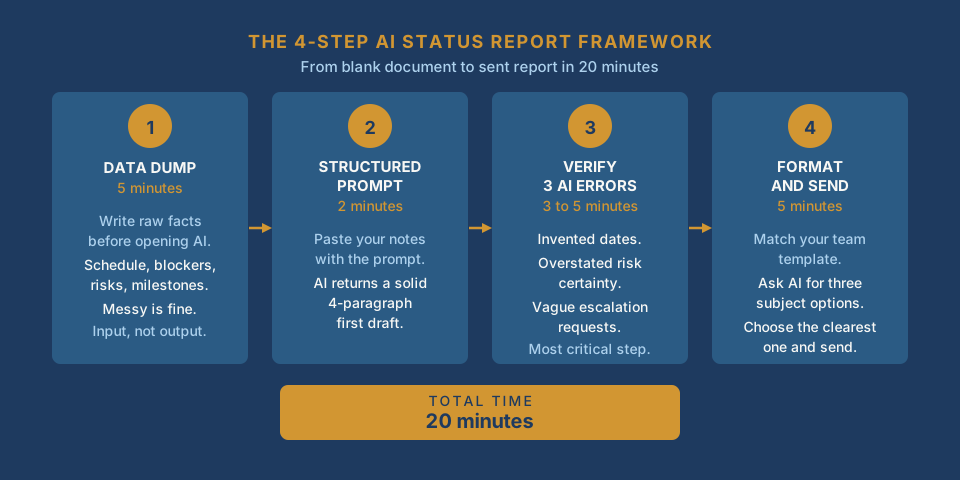
Step 1: Write a 5-Minute Data Dump
Before you open your AI tool, spend 5 minutes writing a short raw list. Do not write prose. Write facts:
- Schedule status: on track, at risk, or delayed (and by how much)
- Why (if not on track): one plain sentence
- Blockers that need escalation: name them specifically
- Top two or three risks: brief descriptions
- Milestones in the next two weeks
- Any resource or budget news
Messy is fine. This is your input, not your output.
Step 2: Run the Structured Prompt
Paste your list into your AI tool with this prompt:
You are a project management assistant. I am writing a weekly status report for a steering committee. Here are my raw project notes for this week:
[paste your data dump here]
Generate a status report in 4 short paragraphs:
1. Overall status in one sentence (on track, at risk, or delayed by X days)
2. What happened this week (2 to 3 sentences, facts only)
3. Current risks and blockers that leadership needs to know
4. What we need from leadership this week, if anything
Tone: direct, factual, no filler. No bullet points inside the paragraphs. Plain sentences.
The output will not be perfect. It will be a solid first draft with the right structure already in place, and you will not be staring at a blank document.
If your audience is a technical team rather than an executive group, add one line to the prompt: "Rewrite the above focusing on what is blocking the team and what we need to unblock." You now have two audience-appropriate versions in under 5 minutes.
Step 3: Verify the Three Things AI Always Gets Wrong
Read the AI draft against your raw notes and check for these three problems specifically:
Invented dates. AI fills in plausible-sounding details when your notes are vague. Every date in the report should match a real date from your source data. If you did not give AI a specific date, it may have created one.
Overstated risk certainty. AI defaults to confident language. If you wrote "this might slip," the draft might say "this will slip." Fix the precision before you send. Sponsors remember your predictions.
Vague escalation requests. If the draft says leadership needs to act, confirm the request is specific: who, what, and by when. Vague escalation requests are skipped in practice. Name the decision.
This check takes 3 to 5 minutes. It is the most important part of the workflow.
Step 4: Format and Send
Match your team's standard template if one exists. If you need a subject line, ask your AI tool: "Give me 3 subject line options for this status report. Audience: steering committee. Keep each under 8 words." Choose the clearest one and send.
Total time: 20 minutes.
What AI Cannot Access
Three things you must add manually, because AI has no way to know them:
Verbal context from this week. If something significant came up in a meeting or a side conversation and it did not make it into your data dump, it is not in the report. Add it before you send.
The political temperature. If your sponsor is under pressure from above, a status that reads as "minor delays" may land worse than you expect. You know the room. Adjust the framing accordingly.
What you committed to last week. Check your previous status update. If you said you would resolve a dependency or confirm a date, did you? If not, name it again in this week's report. Sponsors track those commitments more carefully than most PMs expect.
The One Question Before You Send
Before you send, ask yourself: if my sponsor reads only the first paragraph, do they understand the actual situation?
If yes, send it. If they would finish that paragraph thinking things are fine when they are not, rewrite the first paragraph. Everything else in the report is supporting detail. The first paragraph is what gets read and remembered.
Practical AI intelligence for project managers. Weekly, free. Frameworks, prompts, and workflow guidance that help you stay ahead of AI adoption on your projects. No hype. No filler. Subscribe free
The PM Prompt Pack includes a status report prompt template built for this exact workflow. 20 prompts that work across status reports, stakeholder updates, and retrospective summaries. Download free